
Pix Biometric
With Pix Biometria, your users can approve payments without leaving your application. After enrolling their device, they can complete Pix payments using biometric authentication such as facial recognition or fingerprint, ensuring a faster, more secure, and frictionless payment experience.
Who is it for?
Our solution is designed for any merchant or platform looking to offer a frictionless Pix payment journey. It is ideal for businesses aiming to eliminate app-switching (redirections) and significantly increase checkout conversion rates.
What do we offer?
- Integrated Biometric Authentication: Users confirm transactions directly within your platform using their bank's biometric security (Face ID/Fingerprint), without ever leaving your environment.
- Persistent Account Enrollment: After an initial one-time link (account binding), future payments become a "one-click" experience, making recurring transactions faster than ever.
- UX-Optimized Widget: A ready-to-use component with a seamless interface, fully compliant with Open Finance requirements and designed for maximum conversion.
Key Benefits & Value
Pix via Biometrics elevates the payment experience by delivering:
Superior Conversion: By removing friction points, it directly increases conversion rates and reduces drop-offs during the checkout process.
Seamless User Retention: Keep customers 100% within your environment. No QR Codes to scan, no "copy and paste," and no redirection to banking apps.
More Secure: Build trust with biometric authentication powered by Open Finance protocols, ensuring the highest level of fraud protection.
Operational Velocity: Accelerate the time-to-pay with a "one-click" feel that outpaces traditional QR Code or Copy-and-Paste methods.
How the flow works
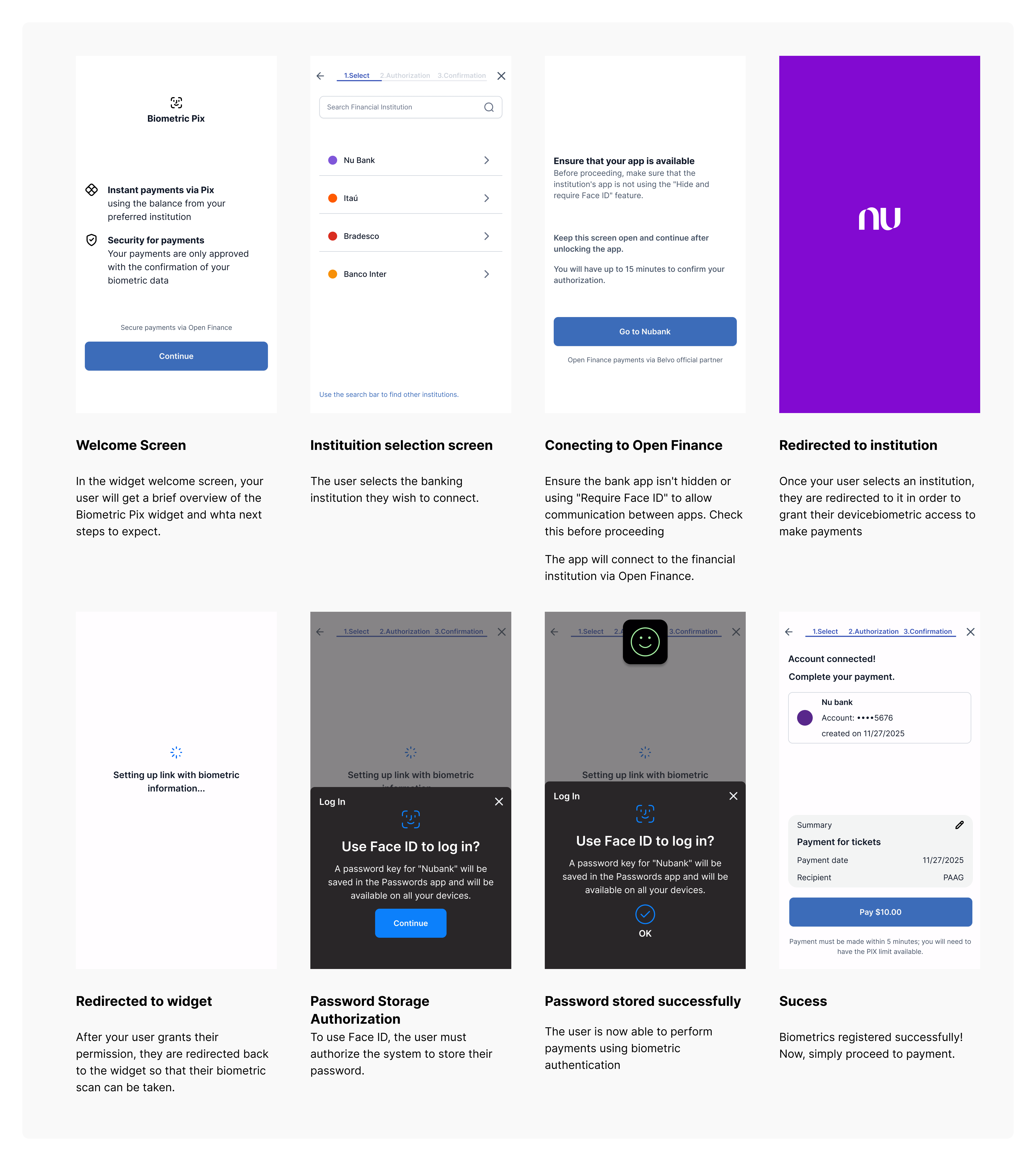
Enrollment (Device Registration)
Enrollment is the process in which a user authorizes a specific device to initiate Pix payments using biometrics.
- Enrollment is mandatory before the first payment
- Enrollment is device-based
- A single user may enroll multiple devices
For each device and bank account that your users wish to use for payments with Pix Biometrics, a registration process will be required. Registration basically consists of registering the device and the user's biometric data with the institution.
Payments
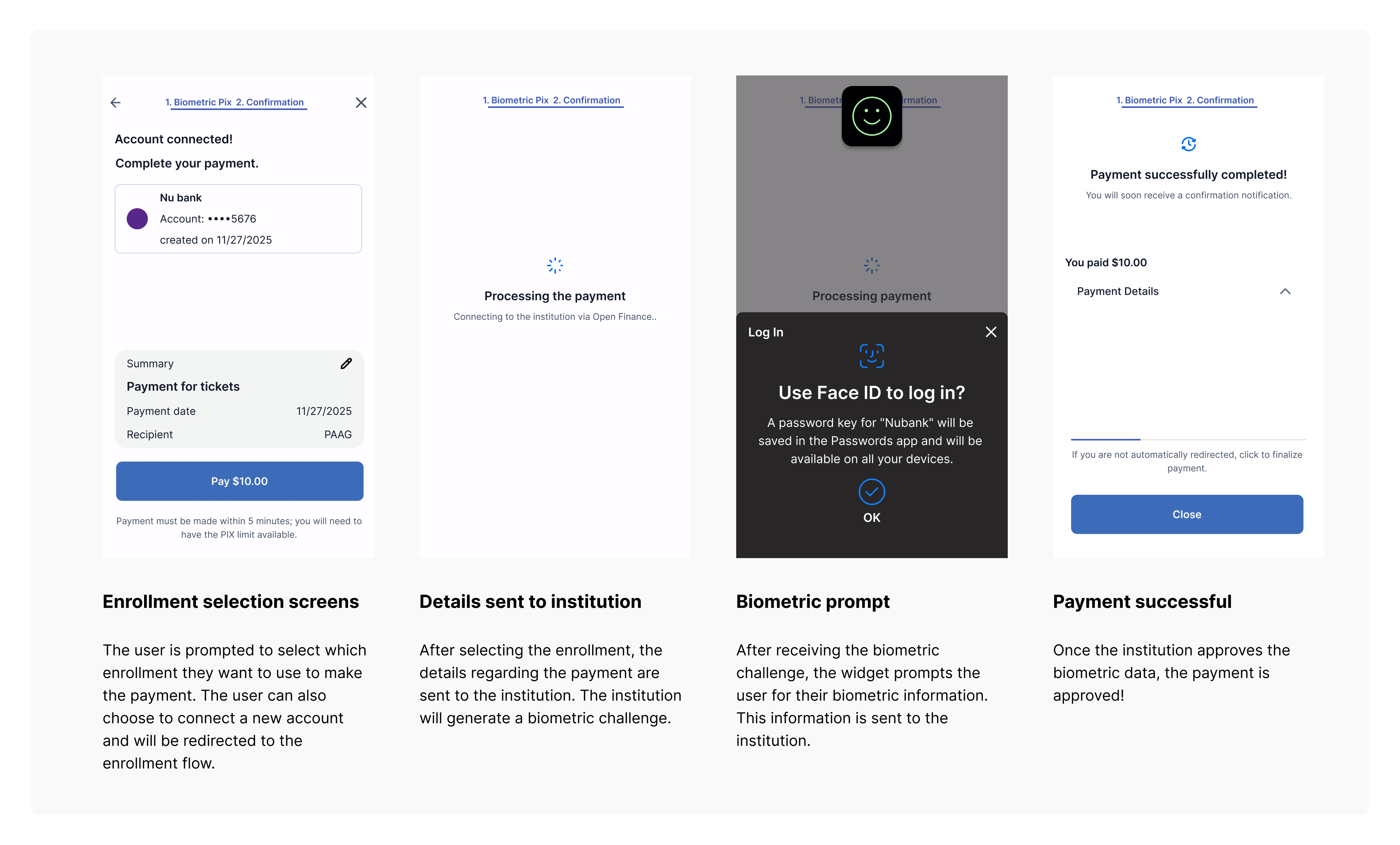
Once enrollment is completed, users can initiate Pix payments without being redirected to their bank’s app.
- Payment authorization happens via biometric authentication within the app
- No QR Code or copy-and-paste flow is required
- Payments are processed in real time via Pix
Integration via Pix Biometric Widget
The integration of Pix Biometric Payments is performed through a fully embeddable and shareable checkout widget, designed to manage the entire Pix biometric payment flow end to end.
The widget already incorporates regulatory requirements and UX best practices, with a strong focus on maximizing conversion for biometric payments. It can be easily integrated into your application and offers limited UI customization options, including dark mode, allowing visual alignment with your app’s experience.
Updated 8 months ago